

Key takeaways
- Implementation starts with real frontline workflows, devices, connectivity, and moments of need.
- Training must fit short sessions, weak connectivity, and operational interruptions.
- A useful platform supports repeated retrieval, not one-time completion.
- Field-ready design is a core buying criterion, not a secondary feature.
Most platforms were built for seated work
A mobile learning platform fails frontline teams when it behaves like a smaller desktop LMS. The issue is not screen size. It is workflow mismatch. A field agent is not sitting in a quiet office with a calendar block for training. They are moving between outlets, handling customers, checking stock, topping up balances, and reacting to promotion changes.
That mismatch becomes an operating problem. New agents drop before the first sale. Support teams answer the same setup questions. Regional managers forward screenshots in chat groups. Product knowledge varies by territory. Compliance checks happen after mistakes, not before market exposure.
The field sets the interface
Mobile-first training must start from constraint. GSMA’s 2025 mobile internet research reports that 96% of the global population lives within mobile internet coverage, yet 3.1 billion people covered by mobile networks still do not use mobile internet. For field sales networks, that gap is practical. Device cost, data cost, signal quality, digital confidence, and language all shape adoption.
Implementation should start with the frontline workflow: identify the tasks people must perform, the moments when knowledge is needed, the devices they actually use, and what must remain available offline. Then deliver the smallest useful lesson, preserve progress through interruptions, sync results when connectivity returns, and give managers a clear next action.
What to evaluate in a mobile-first learning platform
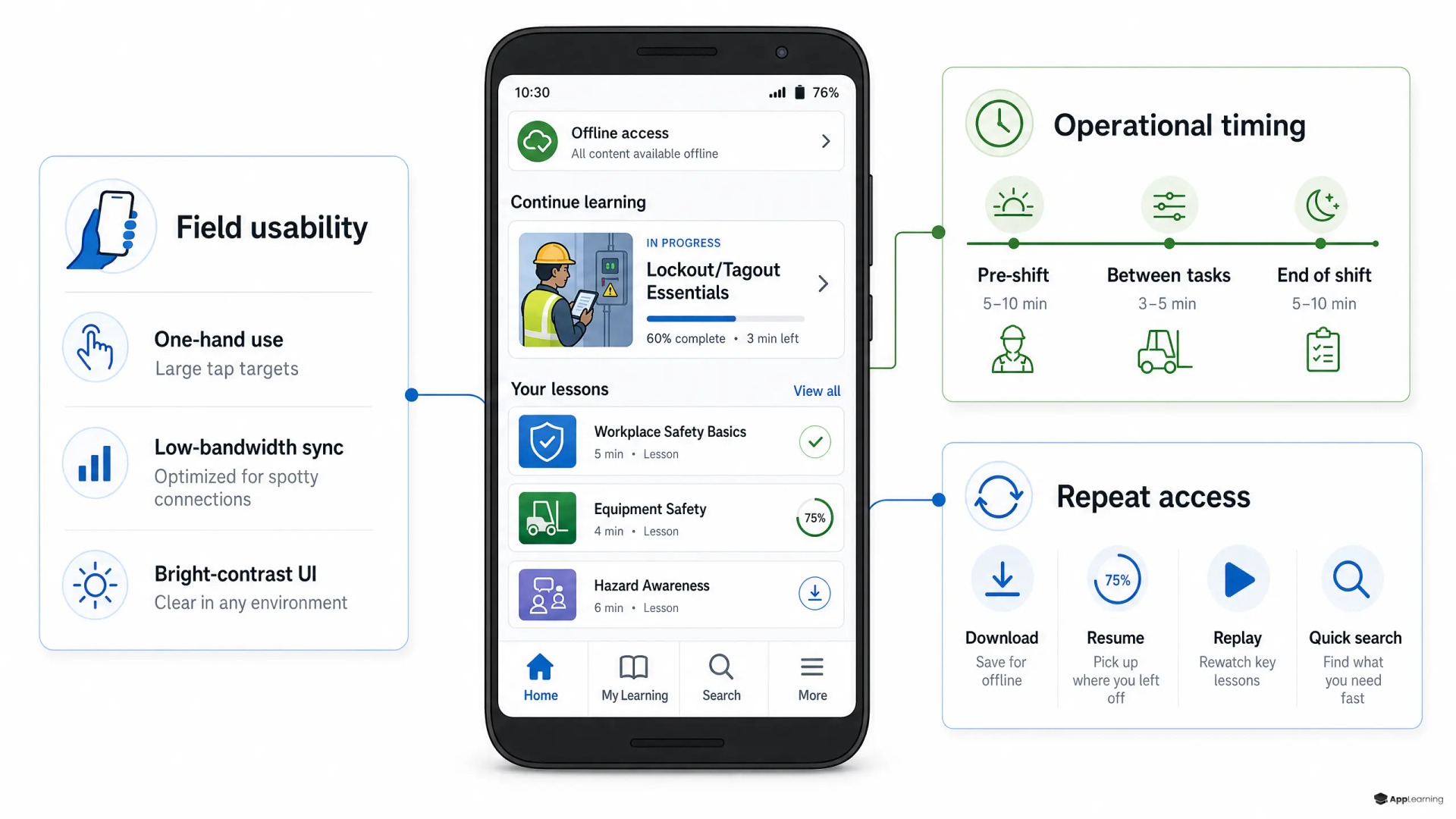
A field-ready frontline learning platform needs a tighter feature set than a corporate LMS. Buyers should look for capabilities that reduce friction at the point of work:
- Low-end Android performance and browser fallback
- Offline download for priority content, with progress and assessment results queued until connectivity returns
- Short lessons with one operational action per screen
- Simple language, images, audio, and multilingual support
- Resume logic after calls, travel, or customer interruptions
- Micro-quizzes, scenario checks, and campaign certifications
- Push updates for tariffs, promotions, and process changes
- Engagement and compliance-completion dashboards by region, role, cohort, product, and readiness status
- CRM, agent app, support, and reward-system integration
These features are not cosmetic. They decide whether onboarding reaches the agent who needs it most. If a mobile training platform requires large downloads, separate passwords, long videos, or desktop administration, it will add another layer of friction to an already fragmented field operation.
Engagement and compliance completion need reinforcement
The goal is not to make agents complete more content. The goal is to make the right knowledge available at the right interval. Cognitive research has long found practice testing and distributed practice to be high-utility learning techniques across learners and contexts. In frontline sales, that means short checks, repeated recall, and refreshers timed around real selling moments.
A mobile platform does not guarantee higher compliance completion. It can remove common barriers by making required learning short, reachable without a desktop, resumable after interruptions, and available offline. Teams should compare completion by role and region, follow up on overdue or failed checks, and verify that learners can apply each compliance step—not count completion alone.
Good to know
How should learning teams implement mobile learning for frontline workers?
Start with one job workflow, map the moments when knowledge is needed, design short mobile steps for the devices people use, make priority content available offline, preserve progress through interruptions, and pilot with a real frontline cohort before expanding.
Why do legacy LMS tools often fail frontline and deskless teams?
Many were designed around long sessions, stable connectivity, formal course catalogs, and office-based users. Frontline and deskless workers need fast access, short steps, offline continuity, mobile usability, and operational context.
How does mobile-first delivery support frontline engagement?
It reduces access friction and fits learning into short work moments. Short tasks, reminders, resume logic, repeated retrieval, and manager follow-up can support engagement, but teams should validate the effect with start, return, completion, and application data.
What should teams evaluate when selecting a microlearning platform for mobile-first training?
Test low-end device performance, offline download and sync, lesson length, multilingual usability, update speed, reminders, completion and assessment reporting, manager follow-up, and integration with frontline tools. Run the test with real deskless users, not only administrators.
Learning must sit inside the operating system
Operational sectors outside sales show the same pattern. WHO guidance on digital health interventions treats mobile delivery of educational content to health workers as a workforce-support intervention, while also naming real feasibility issues such as network connectivity, electricity access, device usability, and sustained support. The lesson for commercial field teams is clear. Mobile delivery works only when the delivery model respects field conditions.
For agent businesses, that means learning should connect to onboarding, CRM, stock ordering, payment readiness, campaign launches, support workflows, and rewards. At App-Learning, this is the design direction we push for: turn source material into short, testable learning paths that can be embedded close to the agent journey, updated quickly, and measured against activation and sales readiness. App-Learning’s mobile learning approach starts from the same premise: static documents store knowledge, but they rarely operationalize it.
Build field-ready learning into your agent app.
TalkHow to implement mobile-first training in the field
Start with one frontline workflow and pilot it under field conditions, not in a boardroom demo. Use the actual device profile, real mobile data, a first-time learner, one required compliance check, and an update that must go live fast. Then measure whether people start, resume, complete, retrieve, and apply the learning when they are distracted, offline, multilingual, and under pressure.
- How long it takes to open the first lesson on a low-end Android phone
- Whether a dropped connection preserves progress and queues completion data for later sync
- How quickly a new agent reaches the first-sale checklist
- Whether tariff changes can be published and certified in hours
- Whether managers can see readiness by region before launch
- Whether missed or failed compliance checks trigger reminders, coaching, or support workflows
- Whether learning data can connect to activation, CRM, and reward logic
The right mobile learning platform does not ask frontline teams to adapt to a training department’s workflow. It adapts knowledge to the rhythm of the field. For a fast-growing agent business, that is the difference between content access and operational readiness.