
Key takeaways
- Training portals range from simple content libraries to managed learning systems.
- Audience type should determine the platform model and level of governance.
- Tracking and fast content updates become essential as training scales.
- App-Learning fits teams that need a branded portal with structured learning paths.
A portal is a delivery model, not a product category
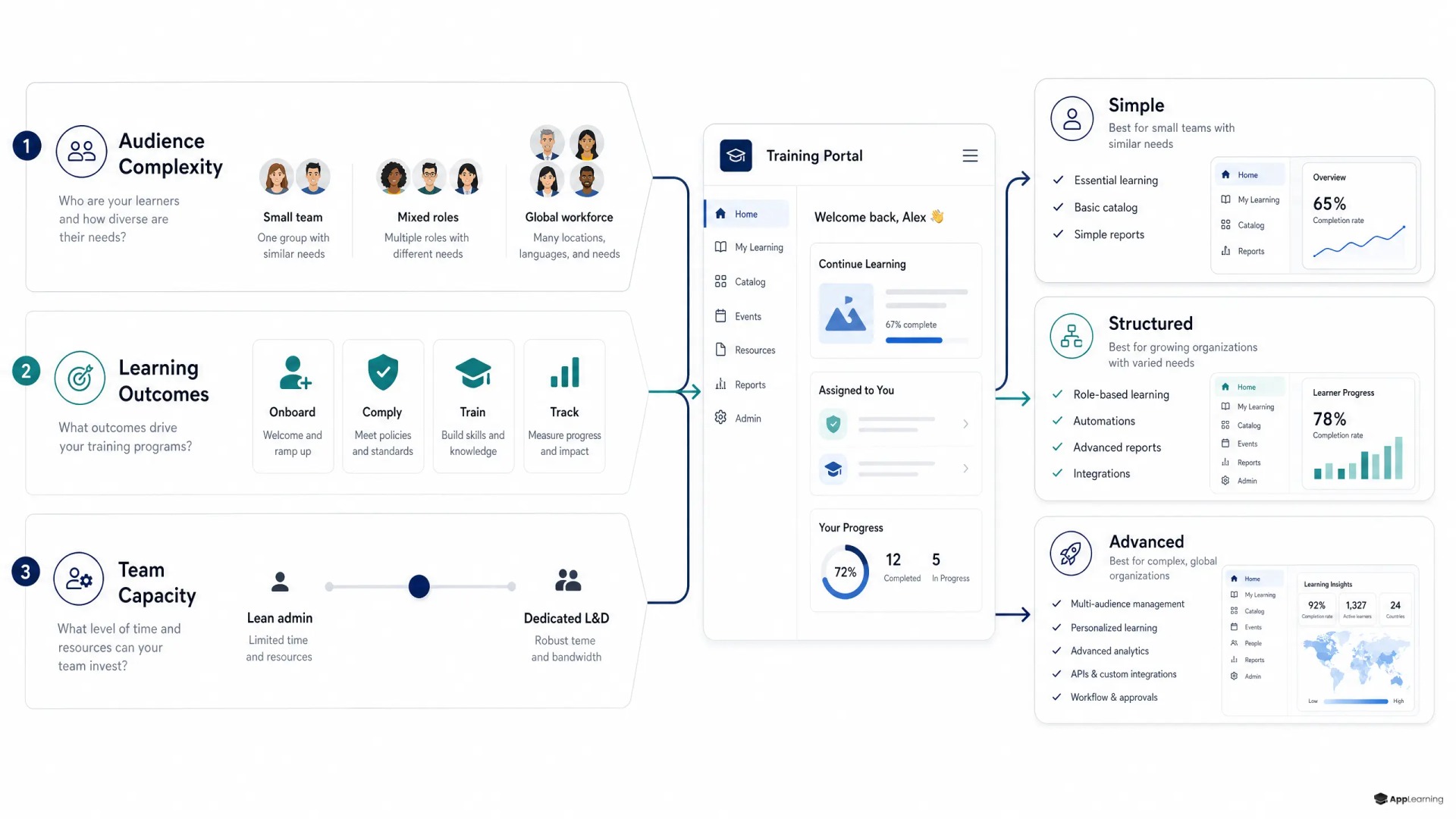
Training portal software is often treated as a single category. It is not. A portal can be a well-organised library of documents, a formal learning management system, or a branded academy with role-based journeys. The right choice depends on who needs training, what they must be able to do afterwards, and how much administration the team can sustain.
A simple training portal works when people need reliable access to reference material. It can centralise product guides, process notes, recorded sessions, and policy documents. This is useful for low-risk knowledge that changes infrequently. It breaks down when managers need to assign different training by role, verify completion, or see where people fail.
An LMS portal becomes necessary when training has rules. New hires may need a defined sequence, fraud analysts may need a mandatory refresher, and managers may need evidence that a learner completed required modules. The Moodle course-completion report illustrates the difference: completion criteria are configured, then administrators can see each learner’s completion status and date.
Three systems create three operating burdens
- Content hub — Best for searchable knowledge and lightweight self-service. It needs strong ownership, naming standards, and regular archiving.
- LMS portal — Best for assigned courses, mandatory learning, assessments, completion records, and structured reporting. It needs learner administration and course governance.
- Branded academy — Best when the learning experience itself needs to build product understanding, capability, culture, or customer confidence. It needs deliberate learning design, not just uploaded files.
The mistake is buying for the most advanced feature on a sales checklist. A 120-person fintech with continuous hiring does not need enterprise complexity everywhere. It does need a system that can reliably deliver a common onboarding core, then route people into department-specific learning for Support, Operations, Business, Risk, or Fraud. The platform should make that structure easier to run, not turn People Operations into a software administration team.
The academy layer turns knowledge into a repeatable system
A branded academy is useful when fragmented internal knowledge must become a consistent experience. It combines a recognisable home for learning with short lessons, assessments, learning paths, certificates, and progress data. That matters when onboarding quality can no longer depend on which manager happens to explain a process.
App-Learning’s academy platform is designed for this middle ground. Teams can create branded academies, assign paths by role, team, department, or seniority, update content without technical work, and track progress, quiz results, and learner activity. Its content workflow also turns existing slides, PDFs, videos, process documents, and expert input into reviewed learning modules rather than leaving critical knowledge in static files.
For a scaleup, this creates a practical sequence. Start with a company onboarding academy. Add a focused academy for a high-risk or high-volume function. Then expand only where repetition, inconsistency, or compliance exposure justify a structured path. This is a more durable approach than attempting to convert every document into a course on day one.
The buying test sits in daily operations
Compare online training portal software through the work your team must perform each week, not through a generic feature grid. Four areas expose whether a platform will hold up after launch:
- User management — Can the team assign learning by department, role, location, seniority, or employment stage without manual workarounds?
- Analytics — Can managers distinguish enrolment from progress, completion, assessment performance, drop-off, and overdue learning?
- Content operations — Can subject-matter experts update a lesson quickly while the learning team keeps a clear review and publishing process?
- Learner experience — Can a busy employee find the next useful lesson, complete it in short sessions, and understand why it matters?
Analytics need enough depth to trigger action. For example, TalentLMS learning-path reports separate completed, in-progress, not-started, and not-passed courses. That is more useful than a single completion percentage because it tells an operator whether the problem is access, engagement, or understanding.
Good to know
When is a simple training portal enough?
Use a simple portal when training is mainly reference material, the audience is small, and completion evidence is not required. Add structured learning when role-based assignment, assessments, or reporting become important.
Should a scaleup choose an LMS or a branded academy?
Choose an LMS when formal administration and compliance controls are the primary need. Choose a branded academy when onboarding, engagement, capability building, and a clear learner experience need equal weight.
What should be measured in an employee training portal?
Track assignment, progress, completion, assessment results, overdue learning, and common knowledge gaps. Use those signals to improve the learning path and the underlying operating process.
One audience rarely needs one experience
Internal employees, customers, and partners can share a platform, but they should not share the same learning design. Employees need role readiness, process accuracy, and consistent cultural standards. Customers need clear product education that helps them act with confidence. Partners need enablement that reflects their commercial or support responsibilities. Each audience needs different entry points, language, permissions, and measures of success.
For HR and People leaders, the priority is usually an employee academy that preserves a common onboarding standard while allowing departmental depth. Build a shared foundation around company context, security, product, values, and operating principles. Follow it with role paths owned by the teams closest to the work. This keeps central standards firm without forcing every function into the same course format.
Build a training portal your teams can keep current.
TalkA portal earns its place through upkeep
Before buying, test the platform against a real training journey: a new Support hire, a Fraud refresher, or a product release that affects several teams. Ask who creates the content, who approves it, how learners are assigned, what evidence is retained, and how an outdated lesson is found and replaced. If those answers rely on spreadsheets, inboxes, and heroic managers, the system is not yet designed.
The best training portal is not the one with the longest feature list. It is the one your team can keep accurate, learners can finish, managers can trust, and the company can extend as new roles, markets, products, and regulatory duties appear.