

Key takeaways
- Training portals make learning easy to find but may lack management depth.
- LMS tools govern assignments and reporting but can feel heavy for learners.
- Audience, governance, and reporting needs should determine the platform choice.
- A branded academy combines accessible learning with operational structure.
- App-Learning fits teams turning fragmented knowledge into measurable learning journeys.
Two systems with different default jobs
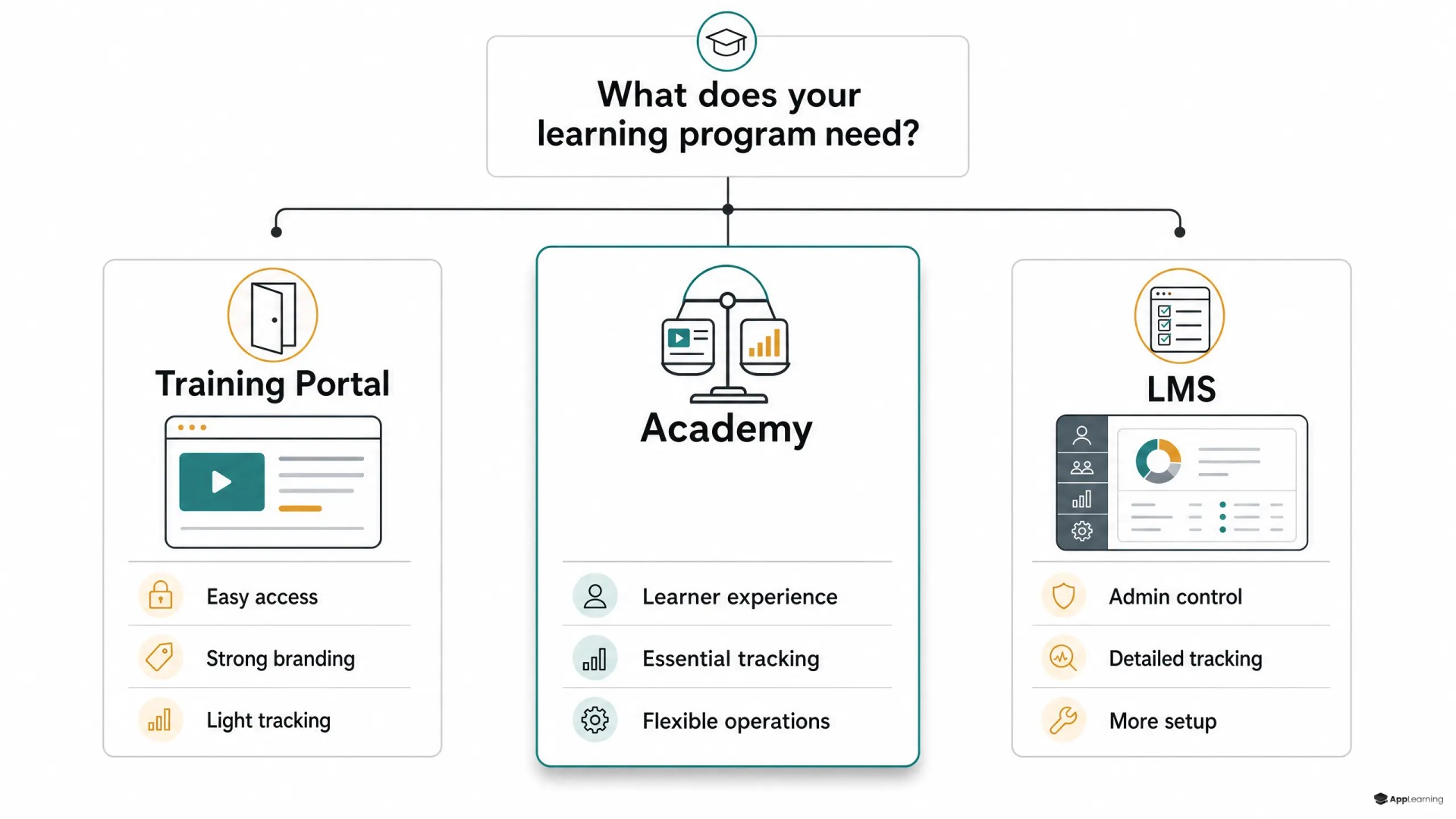
The training portal vs learning management system debate is often framed as a feature comparison. That misses the real distinction. A training portal is a learner-facing destination. Its main job is to make useful knowledge easy to discover, consume, and return to. An LMS is an operating system for training. Its main job is to assign learning, control access, define completion, record results, and give administrators evidence that a programme ran.
Good training portal software puts the experience first. It can feel like a branded knowledge hub, academy, or product extension rather than a corporate system. That makes it useful when people need quick answers, short onboarding modules, or self-directed education. The risk is simple: if the portal becomes a polished folder of videos and PDFs, teams cannot reliably see who learned what, where understanding broke down, or whether critical training reached the right people.
An LMS starts from the opposite end. It treats learning as a governed process with users, roles, enrolments, requirements, assessments, and reports. For example, Moodle’s completion settings can combine activity completion, grades, dates, and manual sign-off, while its reporting tools cover course completion, activity status, grades, and participation. That structure matters when training supports compliance, audit readiness, certification, or manager accountability.
The trade-off is operational, not cosmetic
The training portal vs LMS choice changes who does work after launch. A portal reduces friction for learners. An LMS reduces ambiguity for administrators. Neither is automatically better. The fit depends on whether the harder problem is adoption or governance.
- Access and discovery — Choose a portal-led experience when learners need a clear, inviting home for practical knowledge. Choose an LMS-led model when controlled enrolment and permissions matter more.
- Administration — LMS workflows suit recurring assignments, due dates, manager oversight, and formal completion rules. A portal needs enough structure to avoid becoming an unmanaged content library.
- Learner experience — Portals usually support shorter, more branded, and easier-to-browse journeys. LMS interfaces often reflect the needs of administrators as much as learners.
- Reporting — If leaders need evidence by person, team, role, or course, tracking must be designed into the system. Page views alone do not prove readiness.
- Content operations — Fast-growing teams need to update small learning units when products, policies, and workflows change. Rebuilding a full course for every update creates a maintenance backlog.
The academy model closes the gap
Many scaleups do not need a bare portal or a heavyweight LMS. They need an academy model: a branded, easy-to-enter learning environment with role-based paths, assessments, certificates, and usable progress data. It treats learning as part of the employee experience while preserving the operational controls that People teams, managers, and risk owners require.
This is the space where App-Learning fits. Its academy platform supports branded web and mobile academies, role-based learning paths, quizzes, certificates, and analytics for employee and external audiences. Its content creation workflow also turns slides, PDFs, process documents, and expert input into reviewed learning modules, which matters when knowledge is scattered across teams rather than ready for publication.
For a fintech with 100 or more employees, the goal is not to recreate every manager handover in software. It is to define a common onboarding core, route people into role-specific learning, and keep critical content current. Fraud, Operations, Support, Business, and Product teams can share company context while receiving different workflows, product knowledge, and compliance refreshers.
Internal and external audiences create different constraints
Good to know
What is the main difference between a training portal and an LMS?
A training portal focuses on access, discovery, and presentation. An LMS focuses on assignments, administration, completion rules, assessment, and reporting.
Can a training portal track completions?
It can, if it includes learning paths, assessments, and analytics. The key question is whether the tracking is strong enough for manager oversight, audits, or recurring mandatory training.
When should a scaleup choose an academy model?
Choose an academy when learners need a branded and engaging experience, but the business also needs role-based paths, measurable progress, content governance, and room to scale across teams or audiences.
Is an LMS necessary for employee onboarding?
Not always. A portal or academy can work for onboarding when it provides the required structure and reporting. A conventional LMS is more suitable when formal assignments, compliance controls, and detailed administration dominate the requirement.
Internal learning needs proof and consistency
Employee onboarding often requires both a strong learner experience and an administrative record. New hires need a fast route to the company story, product, tools, policies, and ways of working. Managers need to know whether the core path was completed. Compliance owners may need assessment results, refresher status, and an exportable record. A simple portal is enough only when the organisation can accept informal completion and limited evidence.
External education needs low-friction entry
Customer and partner education has a different centre of gravity. People arrive through product onboarding, a help centre, an email, a sales conversation, or a shared link. They need fast access, relevant paths, familiar branding, and no exposure to internal material. A portal-led academy often works well here, provided it still separates audiences and measures progress where education affects activation, support demand, or partner readiness.
Build a learning system your teams can run as you scale.
DiscussA selection test for the system you must run
Use the operating reality, not the vendor label, to choose between a training portal, an LMS, and an academy model.
- Name the audience. Are learners employees, managers, customers, partners, or several groups with different permissions?
- Define proof. Do you need only engagement signals, or defensible completion, scores, certificates, and exports?
- Map the learning path. Is the work self-directed discovery, structured onboarding, mandatory compliance, or a mix?
- Test the content workflow. Can subject-matter experts update a product change or policy revision without a long production cycle?
- Run one real scenario. Build the path for a new Support hire, a Fraud refresher, or a customer feature launch before committing to a platform.
The best decision is rarely about choosing the system with the longest feature list. It is about building a learning operation that people can enter without friction, managers can trust, and content owners can maintain. When growth makes knowledge harder to transfer by hand, a well-designed academy turns training from a one-time project into reliable infrastructure.