

Key takeaways
- Accessibility problems scale with every published course.
- Authoring components should encode semantics and keyboard behavior.
- AI can draft alternatives, but humans must verify meaning.
- Accessible templates reduce remediation work and publishing risk.
Accessible learning content does not start at export. It starts when an author chooses a layout, adds an image, inserts a quiz, uploads a video or changes a color. For HR and L&D teams in finance or crypto, this is an operating issue. Training portfolios grow fast, compliance updates arrive often and a fragmented stack makes every course harder to govern.
Remediation breaks at portfolio scale
Post-publication accessibility remediation looks manageable when there are ten courses. It fails when there are hundreds. Each missing heading, weak contrast pair, inaccessible drag interaction, unlabeled button or uncaptioned video becomes a manual exception. The cost is not only the fix. It is retesting, republishing, version control and audit evidence.
The European Accessibility Act entered application on 28 June 2025 and made accessibility more visible for covered products and services, including banking services. Internal employee learning is a different context, but the direction is clear. Regulated firms need learning systems that can show control, not heroic cleanup.
The content model carries the decision
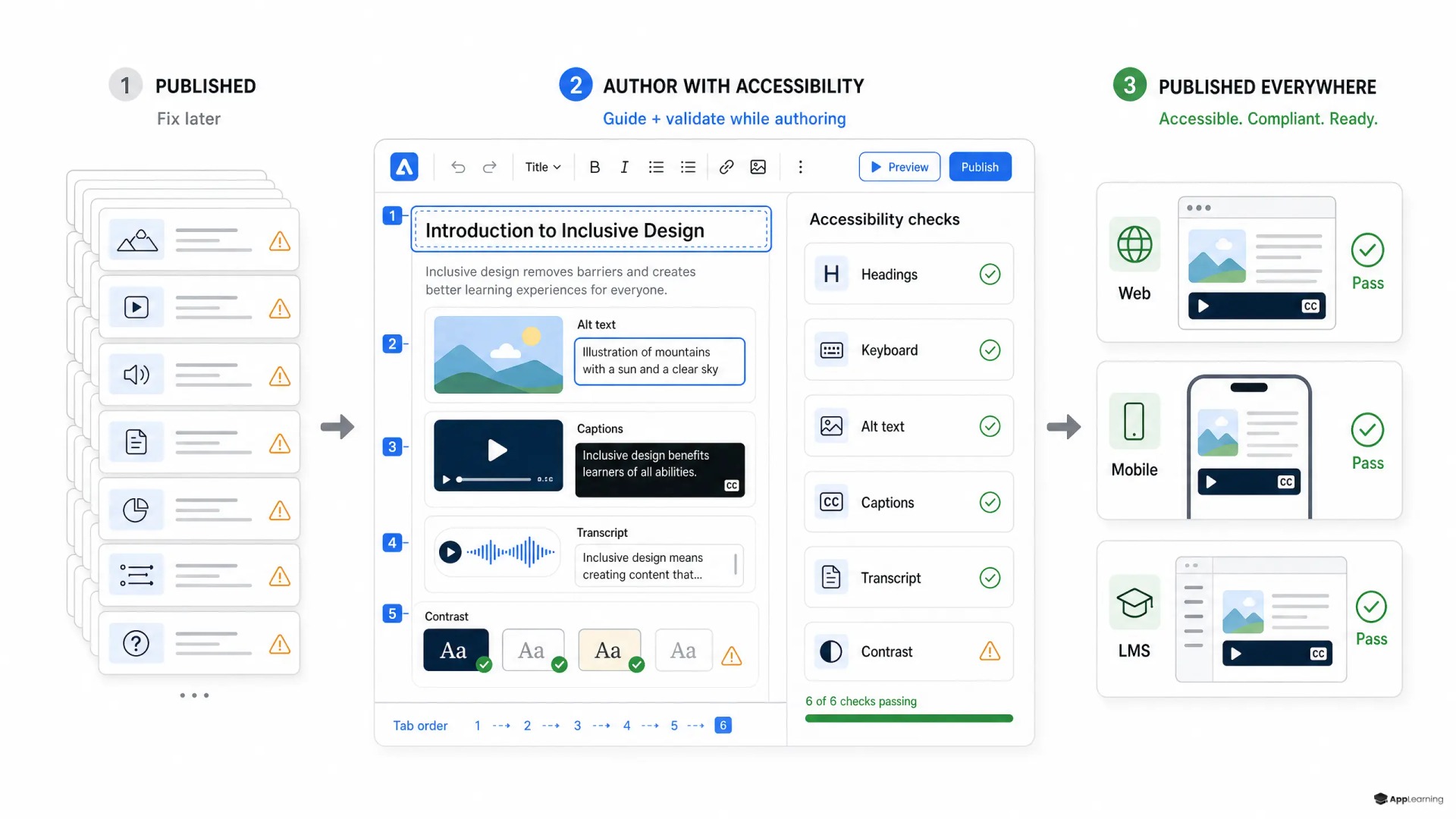
A WCAG authoring tool should not be a blank canvas with a scanner attached. The W3C Authoring Tool Accessibility Guidelines place support for accessible content production inside the authoring process itself. That means the editor must know which decisions affect semantic structure, keyboard operation, alternative text, captions, transcripts and contrast before content is published.
- Headings must be structure, not visual size.
- Images need an alternative text state, not only a text box.
- Video assets need caption and transcript requirements.
- Interactive blocks need defined roles, focus order and keyboard behavior.
- Color choices need token-level contrast checks.
Components turn standards into behavior
Reusable components are where inclusive e-learning design becomes practical. A card sort, scenario choice, accordion, flashcard, slider or simulation step should carry its accessibility behavior by default. Authors should configure content and feedback, not rebuild keyboard logic. An accessible LMS can render content well, but it cannot repair a course package that exports poor semantics.
Europe’s EN 301 549 standard treats authoring tools as part of accessibility delivery by referencing accessible content creation, repair assistance and templates. The operational lesson is simple. Encode once in the component library, then inherit across many academy modules.
- Block invalid publishing states where possible.
- Warn authors when judgment is required.
- Store accessibility metadata with the asset.
- Test components with keyboard and assistive technology workflows.
- Keep validation results visible in the publishing pipeline.
Good to know
Does accessible learning content slow course production?
Only if every course is treated as custom work. Accessible templates and components reduce rework and make production more predictable.
Can AI create alt text and captions automatically?
AI can draft them and flag gaps, but a human must verify meaning, accuracy and learning context.
Is an accessible LMS enough?
No. The LMS matters, but inaccessible course packages can still create barriers inside a technically accessible platform.
Where should finance L&D teams begin?
Start with the authoring model, component library, templates and accessibility validation rules before scaling new academy content.
AI helps draft, humans decide meaning
AI can speed up accessibility validation. It can suggest alt text, find empty labels, summarize transcript gaps, flag contrast issues and identify slides that need structure. It should not decide meaning alone. The W3C evaluation guidance is clear that tools cannot determine accessibility by themselves; knowledgeable human evaluation is still required. The same applies to AI-generated alternatives.
Alt text shows why. The W3C alt decision tree depends on context: decorative, functional, informative or complex. A product screenshot in onboarding, a risk chart in compliance training and an icon inside a quiz all need different treatment. AI can draft. The content owner must verify the instructional purpose.
Build accessible academy content from the component up.
PlanAccessible academies need operating rules
For App-Learning, the point is not to add an accessibility checklist at the end of academy production. The point is to build the academy and the authoring layer as one governed system. Templates, reusable interaction components, editorial guidance, metadata, review states and publishing rules should make accessible output the normal path.
That is especially important in finance and crypto, where learning must move fast without weakening control. Accessibility becomes part of the same system as compliance mapping, role-based learning paths, analytics and content governance. It is not a side project. It is a content-system capability.
The strongest accessibility work is invisible to most authors because the system has already made the right path easy. When the authoring model carries the rules, every new course starts closer to usable, compliant and measurable learning.