
Key takeaways
- Markdown improves collaboration between authors, SMEs, and AI content systems.
- Keep lesson IDs, quiz logic, and content schemas outside the review file.
- Validate assessments, media, and locale mappings before CMS import.
- Compare approved edits and test the live learner preview before release.
A review file is not a learning object
For a startup with 50 or more people, onboarding content often starts as a mix of founder knowledge, manager notes, slide decks, and AI-generated drafts. The hard part is rarely producing first-pass copy. It is moving that copy through SME content review without losing decisions, creating duplicate versions, or handing an untested lesson to new hires.
That is where Markdown course authoring becomes useful. It gives authors, subject-matter experts, and AI systems one lightweight file that remains readable to humans and usable by machines. It should not, however, become the source of truth for every part of a course.
Word and PDF turn feedback into a translation task
Word documents and PDFs work well for reading, but they create friction once content enters a production workflow. Comments sit in one file, course copy moves to another, and an operator must interpret changes before updating the CMS. Tables break, formatting drifts, and the team loses a clean comparison between the reviewed draft and the published lesson.
This weakens AI course content automation. An agent can generate structured lesson copy quickly, but every export and conversion introduces another handoff. For lean teams, that handoff becomes a hidden operating cost. It slows release cycles and makes onboarding quality depend on whoever knows the current process.
Google makes the Markdown file collaborative
On October 5, 2026, Google announced native editing and collaboration for Markdown files in Docs, plus rendered previews in Drive. The file can stay in `.md` or `.markdown` format rather than being converted into a Google Doc.
That changes the review layer. SMEs can comment on a lesson in the environment they already use, while the content team retains a machine-readable file for downstream work. Google’s Markdown help guidance also makes the boundary clear: some Docs-only features, including font colors, highlights, alignment, smart chips, and HTML formatting, do not survive as Markdown.
That limitation is healthy. It forces teams to separate content meaning from visual decoration. A course review file should contain headings, explanations, examples, tables, links, and clear review comments. It should not carry hidden production logic.
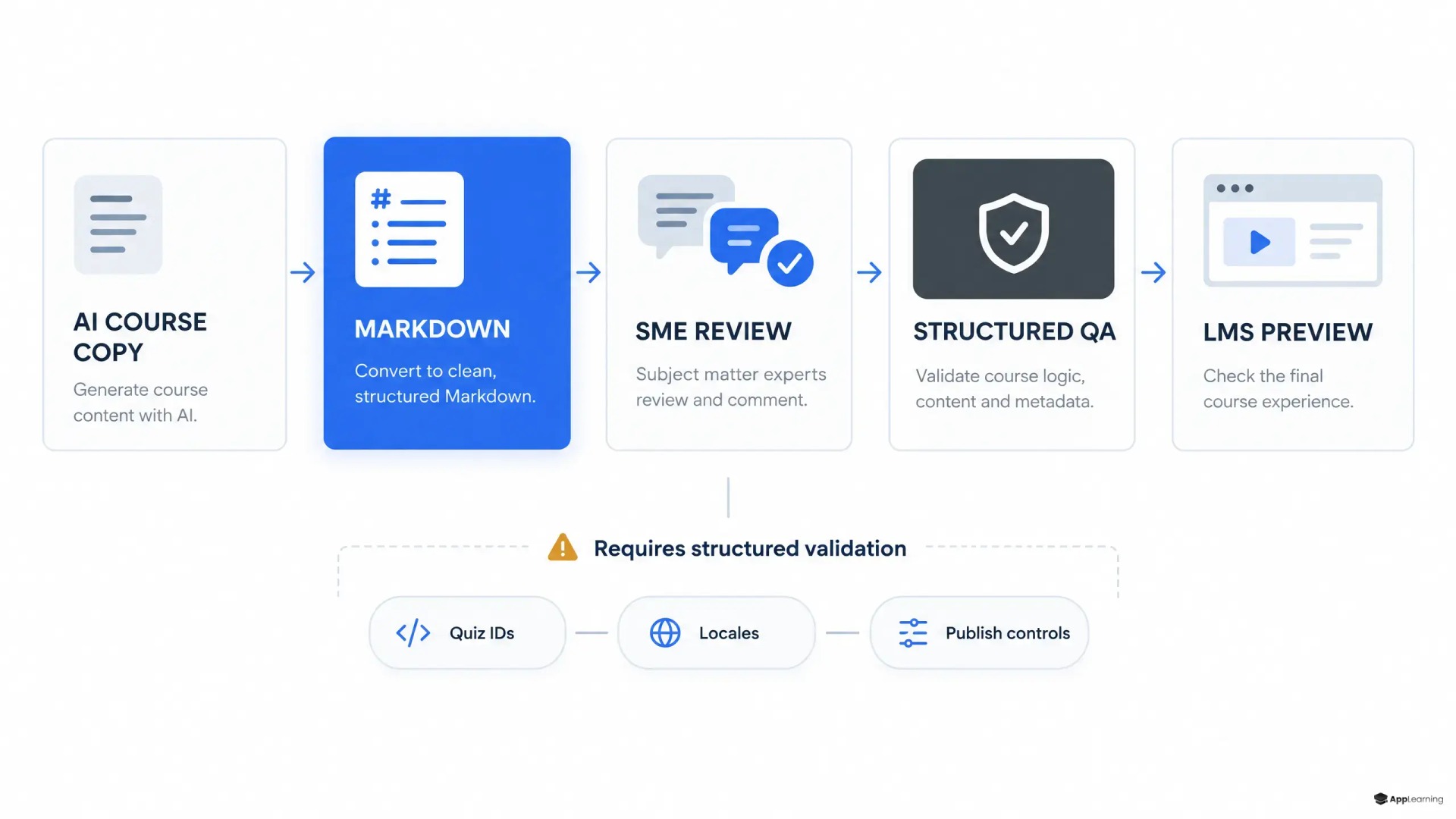
A two-layer authoring architecture
The practical model is simple: use Markdown for human review and use structured data for publishable learning objects. In an App-Learning implementation, the workflow can run as a controlled pipeline rather than a chain of manual copy-and-paste steps.
- Source documents feed a controlled AI draft with a course brief, audience, tone, and learning objectives.
- The system creates a Markdown lesson draft for SME review and a separate structured record for chapter IDs, objectives, quiz items, media references, and locale keys.
- SMEs review the `.md` file in Google Docs, resolving factual corrections, missing examples, and policy language in context.
- A validator checks the structured record against required fields, allowed question types, answer keys, media assets, and translation mappings.
- The approved canonical data imports into Strapi, while the Markdown copy populates the relevant lesson fields.
- A learner preview verifies the actual experience before the release is marked ready.
The distinction matters. The Markdown file may say, “Select the correct escalation path.” The canonical assessment record must define the question ID, answer options, correct answer, feedback, scoring behavior, and analytics event. A reviewer can approve the wording without approving the logic by accident.
Good to know
Can Markdown replace structured course data?
No. Use Markdown as the review-friendly layer for lesson copy. Keep stable IDs, quiz logic, scoring, relations, media metadata, and locale mappings in a separate canonical schema.
What should SMEs review in the Markdown draft?
Ask SMEs to review factual accuracy, examples, terminology, policy language, sequence, and learner clarity. Keep technical validation and publishing controls with the content operations team.
What should happen before a Strapi import?
Run a structured validation, compare approved edits with the import payload, and test the complete module in a learner preview. Approval of the text alone is not release approval.
Quality gates protect the learner experience
The second gate should happen after SME approval and before Strapi LMS content import. It is where a content operation proves that a reviewed lesson will behave correctly in the product.
- Check that every chapter, activity, and question has a stable ID.
- Confirm that required answers, explanations, and pass criteria exist for each assessment.
- Verify media URLs, alt text, captions, and access permissions.
- Confirm that every locale key has a mapped translation and no fallback text is exposed.
- Compare the approved Markdown revision with the import payload.
- Test completion, scoring, navigation, and rendering in the learner preview.
Do not ask SMEs to inspect JSON, CMS relations, or localization keys. Their job is to validate accuracy and relevance. The content system’s job is to preserve those decisions through publishing. This split keeps expert time focused and makes errors traceable.
Build onboarding content that remains reviewable as your company grows.
Talk to usMeasure the release system, not just course output
Track the operating signals that reveal friction: time from draft to SME approval, unresolved-comment age, validation failures per release, rework after preview, and the number of production defects found by learners. For a growing startup, these measures matter more than the number of modules published. They show whether onboarding knowledge is becoming a repeatable system.
Native Markdown collaboration is not a replacement for an LMS or a CMS. It is a better exchange format between people and automation. When the review copy stays readable, the underlying data stays controlled, and the learner preview remains the final proof, course production can scale without turning every update into a bespoke project.