

Key takeaways
- AI reduces the cost of operational interfaces, not the need for a stable learning record.
- Agents should call narrow, permissioned learning actions rather than manipulate data directly.
- Client-specific LMS internal tools can sit outside the learner-facing product.
- Approvals, run history, and clear ownership make automation safe enough to operate.
- The durable platform advantage is clean data contracts, permissions, and reusable operations.
The Admin Suite Is No Longer the Whole System
For a growing company, the academy back office often becomes the hidden constraint. A new onboarding cohort needs different enrolment rules. A manager wants a progress view that matches a team process. Operations needs reminders, exceptions, and approvals. If every request becomes a core LMS feature, the learner product absorbs internal complexity until both the roadmap and the admin experience slow down.
That trade-off is changing. Retool’s AI-native builder now turns natural-language descriptions, screenshots, and rough prototypes into working internal apps while retaining governed data connections, permissions, query inspection, and run history. This does not make learning systems of record obsolete. It makes a monolithic LMS admin optional.
One Runtime and Many Operational Surfaces
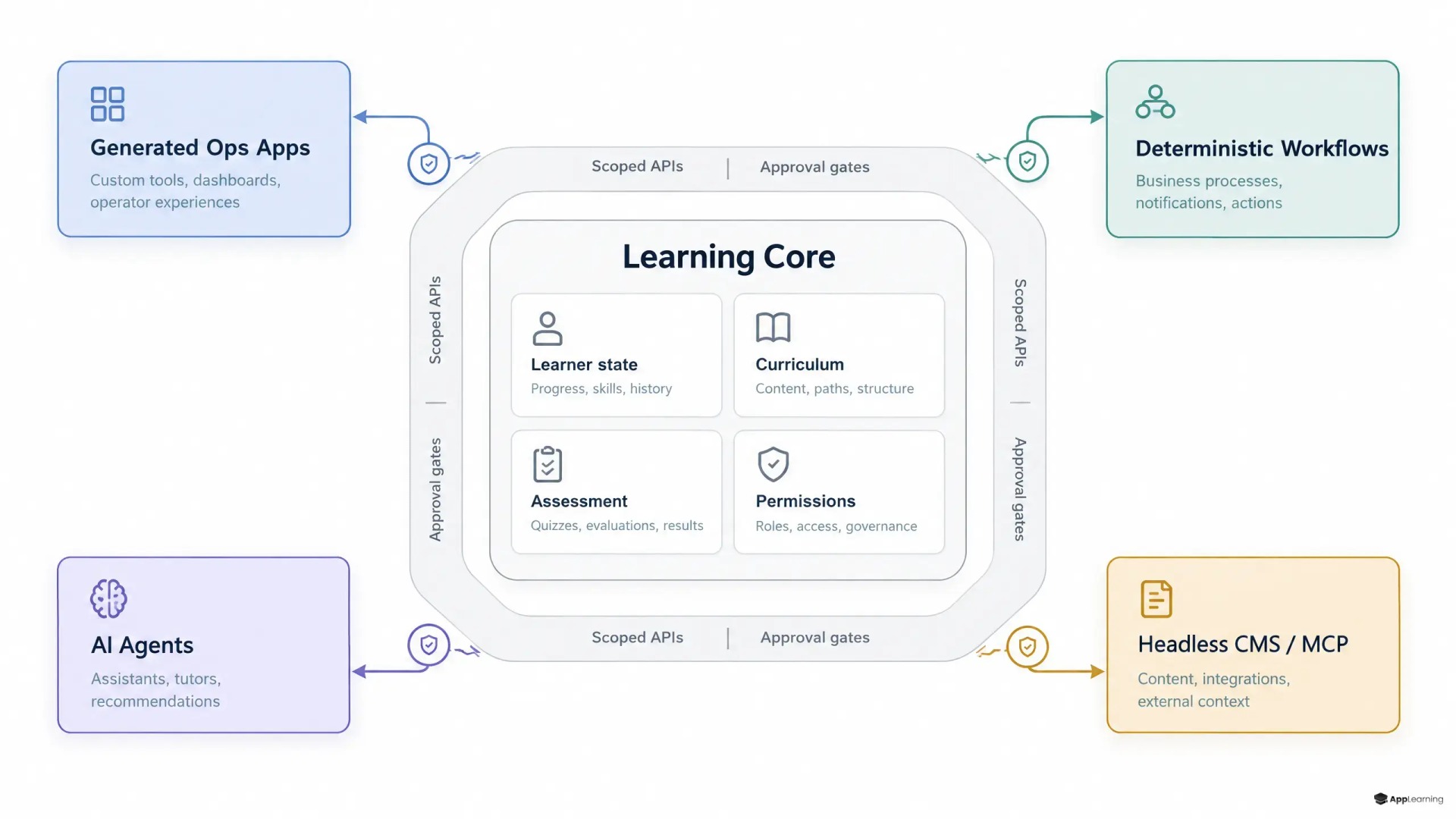
A composable LMS architecture separates the learner runtime from the operations layer. The learner runtime should remain stable: courses, pathways, enrolments, progress, assessments, certificates, roles, and the audit trail behind them. It needs a coherent learning data model, reliable permissions, and explicit APIs.
Around that core, each operational surface can fit the job. A people-operations coordinator may need a simple cohort launcher. A manager may need an exception queue for overdue onboarding. A customer-success team may need a customer-specific learning health view. None of these screens needs to become a permanent tab in the learner-facing product.
- Keep learning records and business rules in the core platform.
- Expose narrow actions such as enrol, assign, remind, approve, and export.
- Build role-specific interfaces around those actions.
- Retire local tools when the underlying workflow stops being useful.
Prompts Change Interface Economics
Prompt-built apps change the cost of the long tail. Teams can create a fit-for-purpose operations interface without funding a full product squad or waiting through a generic LMS release cycle. For a startup with 50 or more employees, this can mean a clean onboarding control panel now rather than another spreadsheet and a set of manager reminders.
The important boundary is architectural. Generated LMS internal tools should consume governed actions from the learning platform. They should not become a second, loosely controlled database for completions, assignments, and content status. Fast interface creation is useful only when the underlying records remain authoritative.
Workflows Carry the Repeatable Work
Learning operations automation is best for work with known steps. A new hire arrives from the HR system. The workflow assigns a role-based pathway, adds a manager checkpoint, sends a reminder after a set interval, and escalates an incomplete mandatory item. The sequence should be visible, testable, and deterministic.
n8n Agents formalise a useful split: workflows can run as tools an agent is allowed to use, while the workflow itself still executes the defined steps. This lets App-Learning treat reusable operations such as “create onboarding cohort” or “send compliance escalation” as controlled services rather than as prompts that write directly into a learning database.
Agents Need Narrow and Named Powers
AI agents learning operations are different from conventional automation because requests are often incomplete. An operations lead may ask, “Which new starters still need security training, and what should we do?” The agent can identify the intent, ask for missing context, inspect permitted records, and select the right next action.
That discretion must stop at the action boundary. An agentic LMS should call named tools with limited inputs and outcomes, not receive broad credentials and improvise across production systems. Sensitive actions should pause for approval. Every run should retain the request, tool calls, outputs, errors, and actor identity. These controls are not a compliance add-on. They are how an operator can explain and correct what happened.
Good to know
What should remain inside the core LMS?
Keep the authoritative learning data model, learner identity and roles, enrolments, progress, assessment records, certificates, core business rules, permissions, and audit trail inside the core system. These are the records other tools should reference, not recreate.
Which learning operations are best suited to workflows?
Use workflows for repeatable sequences with clear triggers and outcomes, such as assigning onboarding pathways, sending reminders, collecting manager sign-off, escalating overdue mandatory learning, or syncing approved learner data from an HR system.
Where do AI agents fit in an academy back office?
Agents work best as a controlled interface for ambiguous requests, investigation, and next-step selection. They should use narrowly scoped tools or workflows, request approval before sensitive writes, and retain a reviewable run history.
Will client-specific internal tools create more support work?
They can if they bypass shared standards. Keep each tool small, reuse versioned platform actions, assign an owner, document its purpose, and define when it will be retired or absorbed into a shared capability.
Content Becomes an Action Surface
Structured content also needs a controlled path into automation. Learning content has versions, owners, review states, local variations, and publishing consequences. It should not live as unstructured prompts or be edited by an agent without clear limits.
Strapi’s MCP tutorial shows the operational pattern: content tools are gated by matching permissions, tokens can be limited to draft changes, and edits can wait for editor approval. For an academy, this supports narrowly scoped actions such as drafting a module update, finding outdated policy references, or preparing a client-specific content variant without granting an agent the power to publish blindly.
Contracts Before Convenience
The foundation is not the agent or the internal app. It is the contract behind each operation. Define the object, allowed state changes, required inputs, permission check, idempotency rule, audit event, and error response before exposing an action to a workflow or agent.
Start with a small action catalogue: create learner, assign pathway, remove assignment, record manager sign-off, request content review, publish approved content, and export a permitted report. Version these actions. Give each one an owner. This reduces bespoke work because customer-specific tools can reuse the same reliable operations instead of requiring product changes.
Build learning operations that scale without turning every request into LMS complexity.
Talk to usManaged Academies Gain a Better Cost Curve
For App-Learning, this model changes the economics of managed academies. The platform team protects a stable learner experience and system of record. The delivery team composes customer-specific workflows, admin surfaces, and approved automations around it. A request that once demanded a custom LMS feature can become a contained configuration or lightweight operational app.
That does not justify uncontrolled tool sprawl. Every added surface needs an owner, a data boundary, support expectations, and a retirement path. But when the core has clean APIs, permissions, and reusable operations, flexibility no longer has to erode product focus. The academy back office can adapt to how each customer actually runs learning while the learning system remains coherent enough to trust.