
Key takeaways
- Preview and production should use the same component renderer.
- Theme tokens must resolve in preview rather than being mocked.
- Responsive layouts and interactive states belong in the preview contract.
- Preview parity becomes a release control for self-service publishing.
- Publish checks should verify the exact branded learner experience.
The gap between editor confidence and learner reality
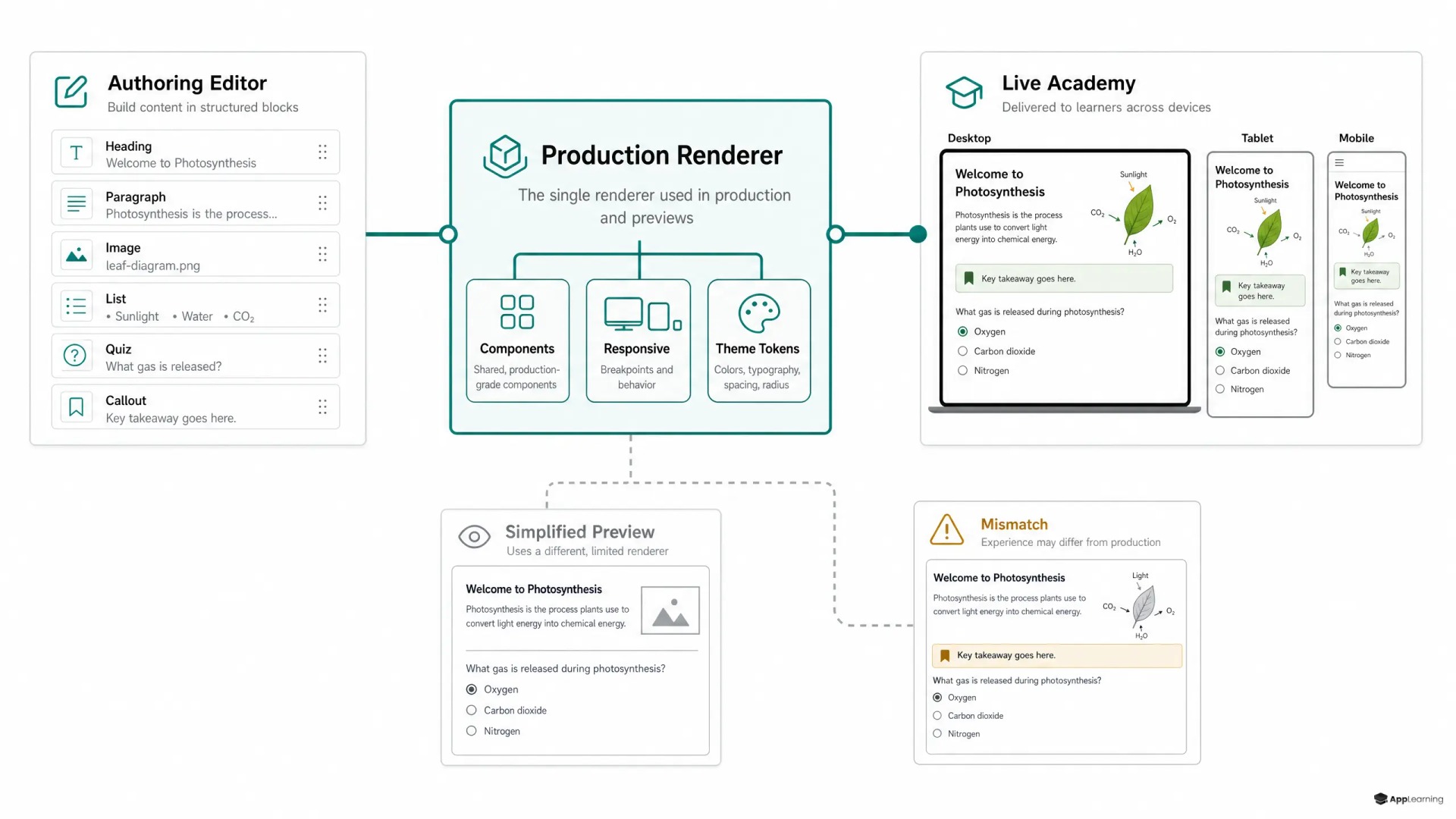
An LMS authoring preview often begins as a convenience feature. It renders enough of a lesson for an author to inspect copy, images and page order. The problem starts when that preview is powered by a simplified renderer while the learner academy uses another component library, CSS pipeline or theme configuration. The author approves one experience. The learner receives another.
That gap is costly in a regulated finance or crypto environment. A broken interaction, clipped risk warning or unreadable branded layout is not just a design defect. It creates rework, delays learning content publishing and weakens confidence in the controls around mandatory training. A course preview must therefore be treated as part of delivery architecture, not as a visual approximation inside the editor.
One rendering contract across two modes
The reliable model is one renderer with two modes: authoring preview and production delivery. Both modes should receive the same structured course data, call the same learning components and resolve the same tenant configuration. The authoring mode can add editing controls, draft labels and test-data tools around the learner experience. It should not replace the learner experience with a parallel implementation.
This distinction matters most in a WYSIWYG course builder. WYSIWYG is a promise about what authors can verify, not merely what they can arrange. The W3C’s guidance for authoring tools makes the underlying principle clear: previews should be at least as accessible as user agents. A preview that skips production behaviour cannot provide that assurance.
Brand tokens must resolve before release
White label LMS authoring raises the stakes. A single course can appear under different brand names, fonts, colour systems, logo rules, spacing scales and navigation patterns. Mocked styling hides the exact defects that tend to reach production: a contrast failure after a customer palette is applied, a font that changes line breaks, a button label that no longer fits, or a spacing token that changes the hierarchy of a compliance notice.
Theme configuration should be data, not a copied stylesheet. The Design Tokens Format Module describes tokens as a way to express design decisions across tools and technologies. In practice, preview should resolve the same token set and tenant overrides as the published academy. Selecting a customer theme in authoring must change the preview through the same rules that will govern delivery.
Responsive behaviour belongs in that contract too. Authors need to inspect the course at the breakpoints their learners use, including narrow mobile screens. The WCAG reflow technique addresses layouts that fit within 320 CSS pixels without two-dimensional scrolling. A desktop-only preview cannot expose whether a callout overflows, a table becomes unusable or a fixed action bar covers the next button.
Interaction is where simplified previews fail
Static content can look correct in a stripped-down preview and still fail when state enters the picture. Questions need their real answer validation, feedback, retry logic, progress handling and completion conditions. Video, accordions, scenario branches, timers and knowledge checks need their actual loading and error states. If production has rules that prevent a learner from progressing, the course preview must show those rules before an author publishes.
This does not mean authors need access to live learner records. Preview can use isolated test attempts and a draft context. It does mean the component behaviour, accessibility semantics and state transitions should remain identical. The more a component changes between preview and production, the less meaningful author approval becomes.
Good to know
What does preview parity mean in an LMS?
Preview parity means authors see the same components, theme configuration, responsive behaviour and interaction logic that learners will receive after publication.
Why is a separate preview renderer risky?
A separate renderer can interpret layout, styling and interactive states differently from production. It creates approval risk because authors may validate a course that changes when it is published.
What should a course preview test before publishing?
It should test the selected brand theme, language, target viewport sizes, accessibility behaviour, asset availability and each interaction’s completion and feedback states.
Self-service publishing needs a hard release gate
When content teams publish directly, preview parity becomes a publishing control. Central learning teams cannot manually test every tenant, language variant and device state after each edit. The platform must give authors a trustworthy view before release, then record what configuration they approved. This reduces dependence on engineering while keeping the release process disciplined.
A practical publish check should verify the exact draft against the selected academy configuration before release:
- Render every component with the selected tenant theme and language.
- Test defined desktop, tablet and mobile viewport profiles.
- Run keyboard, focus and screen-reader checks on interactive components.
- Validate required fields, answer rules, retry paths and completion logic.
- Block publishing on missing assets, invalid links or unsupported component settings.
- Store the course version, theme version and validation result with the release record.
See how a shared rendering contract can strengthen your learning releases.
Talk to usPreview parity turns approval into evidence
For HR and L&D teams, this design choice changes the operating model. Course owners can move faster without asking developers to recreate branded pages. Compliance stakeholders can review the learner-facing experience instead of a misleading editor approximation. And learning teams can use publishing evidence to show which version of a mandatory course was approved for a specific academy.
App-Learning can make this a property of the platform rather than a manual testing habit: one component system, one theming model and one rendering contract shared by authoring preview and the live academy. That approach catches visual drift and interaction defects before they reach learners. More importantly, it makes author approval meaningful. In a branded learning system, the experience shown before publish should be the experience delivered after it.