Key takeaways
- Use motion when learners must understand sequence, mechanism, or change over time.
- Separate media production creates costly review, update, and versioning delays.
- Learning objectives and approved terminology should drive every generated scene.
- Captions, transcripts, localization, and approval belong with the animation.
- AI media creates value through workflow integration, not generation quality alone.
Motion earns its place when time is part of the concept
Educational animation is not a richer replacement for every diagram, screen, or policy page. It earns its place when the learning objective depends on sequence, mechanism, movement, or a change of state. A payment moves through authorization, clearing, and settlement. A fraud signal escalates through controls. A smart contract reaches a condition, triggers an action, and records a result. These are not merely facts to read. They are systems that unfold.
The evidence is conditional, not magical. Animation is most useful when the learner must understand what changes across time and space. If the task is to recall a definition, compare limits, or check a rule, a clear static visual or short interaction may work better. Good animated microlearning makes the transition visible, then gives the learner a stable reference point to inspect and revisit.
The external asset model breaks course iteration
In most learning stacks, an instructional designer writes the lesson, a media team receives a brief, an animation returns as a file, and the LMS receives the final export. Every later change restarts part of that chain. A revised product term, a new approval rule, a changed UI label, or a localization request becomes a ticket, a handoff, and a fresh round of quality assurance.
That model is especially weak for finance and crypto training. Content often needs precise terminology, controlled claims, traceable review, and fast updates. The real cost is not only production time. It is the risk that a polished animation quietly falls out of sync with the policy, product flow, knowledge check, or translated lesson around it.
The learning object should direct the animation
AI animation for training should start with the structured lesson object, not a blank prompt. The lesson already contains the material a generator needs: the learner role, learning objective, approved terminology, source references, brand rules, target duration, and the point at which the learner must act differently.
This changes the authoring job. Instead of asking a model to make a compelling video about transaction monitoring, the author defines the instructional move. Show an analyst receiving an alert. Show which signals raise its priority. Show the decision path. Stop before the conclusion and ask the learner to select the next step. Generation can then support the design rather than invent it.
Scenes need instructional structure
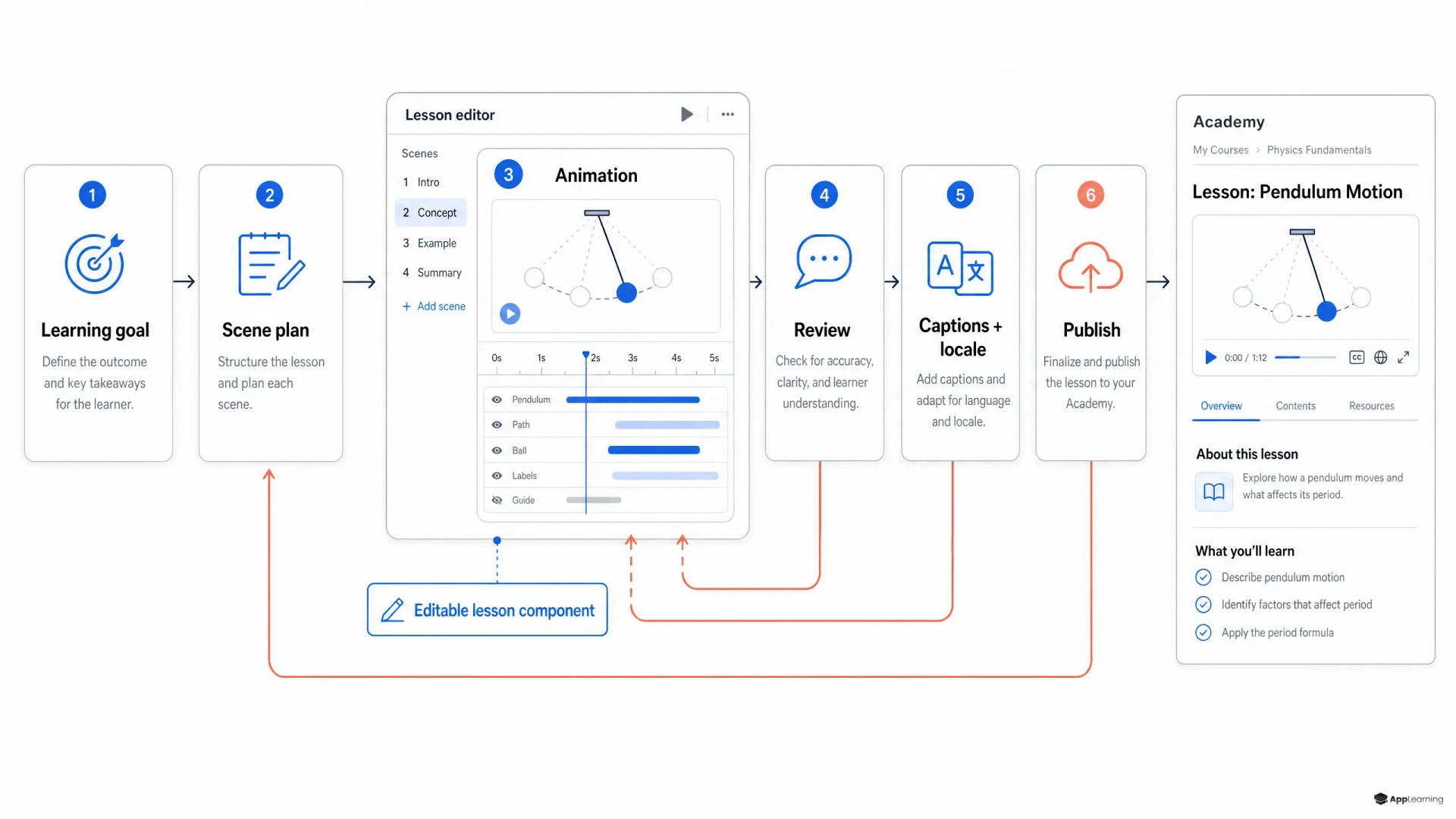
A useful educational animation authoring flow converts one objective into an editable scene plan. Each scene should have a purpose, a visual state, narration or on-screen text, timing, and a clear relationship to the lesson. The author needs to change a step without rebuilding the full asset.
- Define the behavior or decision the learner must understand.
- Break the mechanism into meaningful states rather than continuous visual noise.
- Assign each state a scene, narration line, visual treatment, and duration.
- Use approved terms and visual components from the same content library.
- Connect the animation to a practice question, simulation, or knowledge check.
This is multimodal authoring, not text generation with a video button attached. It gives authors control over what is shown, what is explained, and what learners must do after watching. It also creates a practical path from AI course creation to content that can survive real operational review.
Good to know
When should a course use animation instead of static visuals?
Use animation when learners must understand a sequence, a mechanism, a handoff, or a changing state. Use static visuals when learners need to compare details, inspect a rule, or keep a reference visible while they work.
Can AI-generated animation be used in compliance training?
Yes, if it sits inside a controlled workflow. The lesson should supply approved terminology and source content, while subject-matter experts and compliance owners review the scenes, narration, captions, and published version.
What should an editable animation contain?
At minimum, it should contain a scene plan, narration or on-screen text, timing, visual states, captions, transcript, localization fields, review status, and a link to the lesson version it supports.
How does animation support measurable learning?
Connect each animation to a specific objective and an observable learner action. That may be a decision point, simulation step, confidence check, or knowledge question tied to the mechanism the animation explains.
Accessibility and localization must travel with the media
Accessibility cannot become a post-publish ticket. W3C caption guidance sets a baseline for prerecorded synchronized media with audio, while its guidance on a media alternative shows why learners may also need an equivalent text-based route through visual and spoken information.
For authoring teams, that means the scene plan should generate more than video. It should carry editable captions, a transcript, visual descriptions, source terminology, and localization fields. If a German compliance term changes, the team should be able to find every scene, caption, transcript line, and assessment item that uses it. Translation should adapt the instructional object, not merely replace spoken words after timing has been locked.
Version the lesson and animation as one system
An animation is not complete when it renders. It is complete when its learning purpose, script, scenes, accessibility outputs, approvals, and publishing status are known. The animation should inherit the lesson version, retain its review history, and publish through the same CMS workflow as the surrounding module.
That gives L&D teams a usable control model. A compliance owner can approve the terminology. A subject-matter expert can review the mechanism. A learning designer can check the objective and practice activity. A localization reviewer can assess the translated output. No one needs to reconstruct which video belongs to which course revision from folders and filenames.
Build learning media that stays governed when the business changes.
Talk to usA multimodal authoring loop for regulated learning
The App-Learning direction is not to add animation generation as an isolated feature. It is to make motion a native, reviewable component of the learning system. An author starts with a structured lesson, selects the moments where change needs to be seen, generates an editable storyboard and draft animation, reviews it in context, publishes its accessible and localized variants, and measures the learner response alongside the rest of the module.
That workflow makes media faster to produce, but speed is not the main point. It makes learning content easier to govern, update, and improve. In a regulated business, the durable advantage is not the most cinematic output. It is the ability to turn a changing process into a clear learning experience without losing control of the content that explains it.