
Key takeaways
- Treat learning automation upgrades as production releases, not infrastructure maintenance.
- Map every n8n workflow to learner-facing artifacts and downstream systems.
- Use fixed course fixtures to compare content, locales, quizzes, and media.
- Test credentials, storage, timeouts, and rollback before production migration.
- Approve upgrades only when canary course outputs match expectations.
A planned release with real operational consequences
As of October 8, 2026, n8n 3.0 has not shipped. Its official breaking-changes page schedules the release for October 2026 and describes it as upcoming. That distinction matters. Teams still have time to rehearse, but they should not wait for a release day incident to find legacy Cron, Read PDF, Function, or older OpenAI nodes in a production course workflow.
The planned n8n 3.0 migration also requires Docker for self-hosted deployments, changes storage behavior, removes the in-memory binary-data default, and tightens runtime defaults. A workflow can appear healthy after an upgrade while its schedule no longer fires, its source PDF is not extracted as expected, or a slow transformation now times out. That is an educational operations failure, not merely an automation failure.
Green executions can still produce broken courses
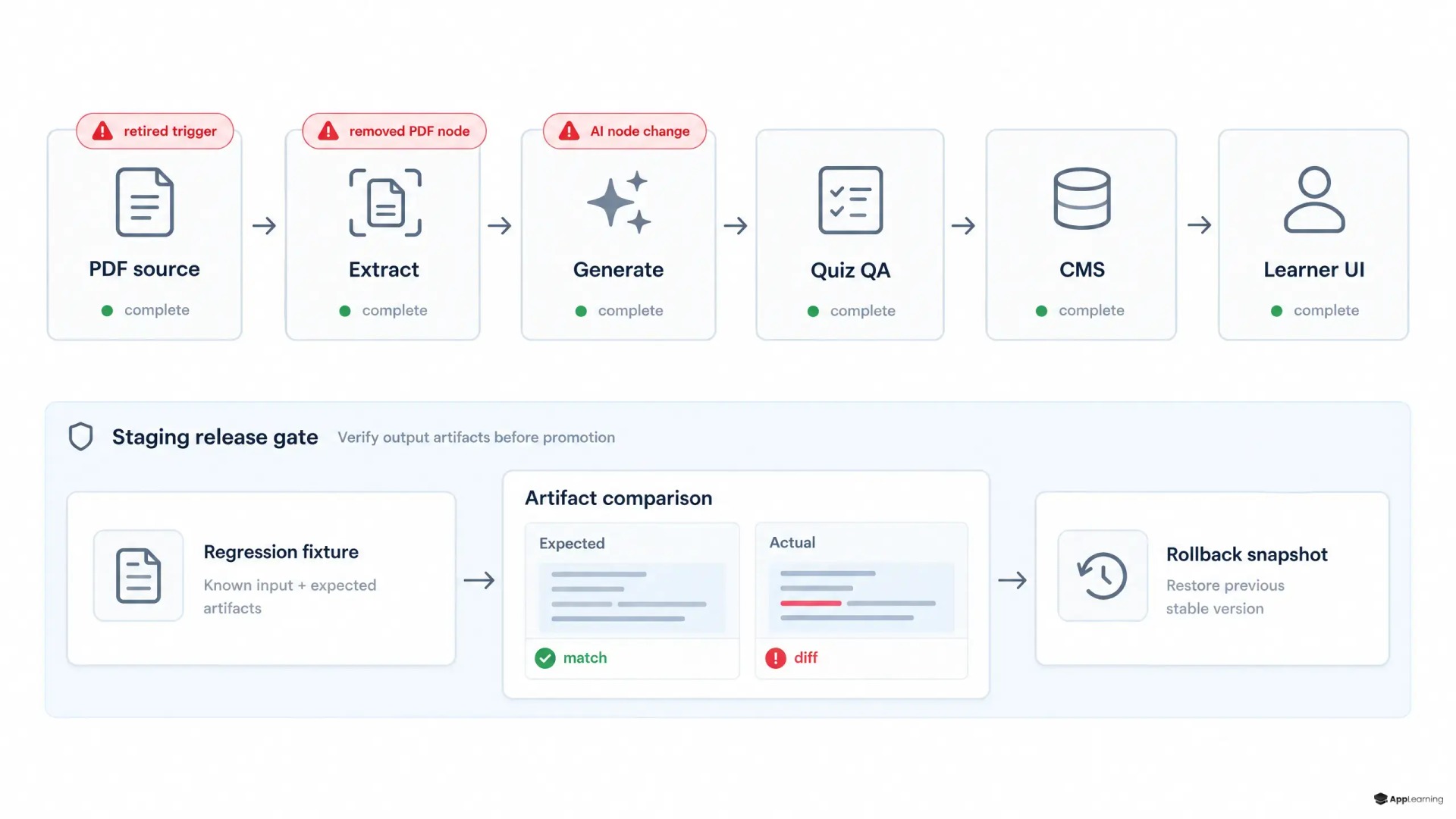
Consider a common chain: a PDF enters a content folder, n8n extracts it, an AI step drafts lessons and quiz hints, Strapi receives structured content, and a learning frontend displays the published course. Replacing a removed node can change an input field, binary file path, item mapping, timing, or branch condition. The CMS may still accept the payload. The learner may then receive an incomplete lesson, an empty translation, a quiz without hints, or a media link that fails only on the course screen.
This is the central rule for n8n content automation reliability: workflow status is a technical signal, not an acceptance criterion. The acceptance criterion is the delivered educational artifact. For an LMS operator, that means checking what a learner can read, answer, download, and complete.
Inventory the chain before changing it
Start with Settings > Migration Report. n8n says the report identifies affected workflows for several planned removals and configuration changes, including removed sub-workflow sources and retired capabilities. (docs.n8n.io) Then turn the report into an operational register, not a developer to-do list.
- Record each workflow, trigger, node version, custom expression, sub-workflow, credential, and binary-data dependency.
- Map each workflow to an owned output such as an imported lesson, German locale, quiz bank, learner notification, or published course page.
- Export workflow JSON and capture database, environment-variable, volume-mount, and object-storage configuration snapshots.
- Name a business owner who can approve the resulting course artifact, not only an engineer who can approve the execution log.
Regression fixtures make learning outputs comparable
Build one small but representative course fixture before the upgrade. Include a source PDF, three ordered lessons, images, one video asset, a graded quiz, empty and completed optional fields, and at least two locale variants. Use stable input files and IDs so output differences are attributable to the migration rather than changing source material.
- Lesson titles, slugs, module order, body length, and required metadata
- Quiz question count, answer keys, hint text, scoring rules, and completion settings
- Locale coverage, fallback behavior, special characters, and untranslated-field handling
- Media checksums, storage paths, signed URLs, and learner-page rendering
- CMS draft and publish states plus the learner-facing API response
Run the fixture first in staging, then as a canary in production with publishing isolated from the main catalogue. Where the plan supports it, separate development and production instances and keep workflow changes moving in one direction; n8n's source-control guidance warns against pushing and pulling from the same instance because changes can be overwritten. (docs.n8n.io) This is LMS workflow regression testing with a learner-visible control sample.
Good to know
Has n8n 3.0 already been released?
No. On October 8, 2026, the official n8n 3.0 breaking-changes documentation lists the release as scheduled for October 2026 and still upcoming.
Which workflows should run as canaries?
Choose a complete course path that exercises content intake, AI generation, translations, quiz creation, media handling, CMS publishing, and learner delivery. A simple webhook test is not enough.
What should a startup measure after the upgrade?
Measure scheduled job delivery, artifact completeness, publishing state, learner-page rendering, and time to detect and recover from a failed course run.
Storage and credentials define the real rollback path
A Docker move changes more than the deployment command. The planned release renames the default binary-data directory from `~/.n8n/binaryData` to `~/.n8n/storage`; a mistaken volume mount can make course attachments appear missing. n8n also advises upgrading its main process, workers, and runners together when external binary storage is in use. (docs.n8n.io) Restore a database backup into a non-production environment and prove that source files, credentials, and a complete canary course still work.
Treat encryption-key changes with extra care. n8n's key-rotation guidance calls the feature a one-way migration after new-format data is written, with recovery dependent on a database backup taken before enablement. (docs.n8n.io) Verify the shared encryption key across main and worker processes, test credential decryption, and document which backup restores both workflow definitions and the data that makes them runnable.
Build a safer course production pipeline with App-Learning.
TalkRelease decisions must be artifact-based
Set a no-ship rule before the maintenance window. Do not proceed if the Migration Report has unexplained findings, a canary misses its trigger, a credential reconnect changes access, a binary asset cannot be retrieved, or any expected content diff remains unresolved.
- Back up and restore-test the database, workflow exports, environment configuration, and storage references.
- Migrate in staging and run the fixed course fixture end to end.
- Compare CMS records and learner-facing outputs against the pre-upgrade baseline.
- Run one controlled production canary and monitor triggers, queue time, failures, and published artifacts.
- Keep a rollback owner, decision deadline, and learner-impact communication ready.
Automated course publishing is a production system. Its release lifecycle must include inventory, rehearsal, output comparison, controlled rollout, and observability. That discipline protects more than an integration: it protects the onboarding and capability-building experience that a growing company depends on.