

Key takeaways
- Credential generation and delivery are separate parts of the completion experience.
- A share icon does not establish that learners understand how to save.
- Native sharing needs testing on representative devices and supported operating systems.
- Explicit save controls add value when comprehension or device support requires them.
- A portable certificate must remain discoverable and usable outside the academy.
A certificate has a second journey after completion
A generated certificate proves that the academy produced a document. It does not prove that the learner can keep it.
The acceptance cycle behind this brief exposed that gap. Native sharing completed a certificate transfer, but reviewers questioned whether other phones would offer local saving and whether learners would recognise the share icon as a route to download. The unresolved issue was the handoff into operating-system controls, not certificate generation.
Save and share serve different jobs
The certificate delivery workflow should distinguish four outcomes.
- Download transfers the certificate file to the device.
- Save places a retained copy in a location the learner can retrieve.
- Share passes the file or a link to another destination.
- Verify provides a separate route to check the issuer and completion claim.
One interface can support several outcomes. Apple’s Safari instructions route PDF saving through Share and then Save to Files. (support.apple.com) That demonstrates a supported route, not universal behaviour across certificate apps or proof that learners will discover it.
Native sharing is a handoff rather than a fixed menu
Apple’s interface guidance describes share sheets containing both sharing destinations and document actions, with an action list people can edit. (developer.apple.com) Acceptance criteria should therefore name the required outcome rather than assume a fixed menu position.
Android’s sharing documentation requires an appropriate content type and access permissions for the receiving app. (developer.android.com) For LMS certificate sharing, the test must establish whether the recipient receives the intended document, not merely whether a destination opens.
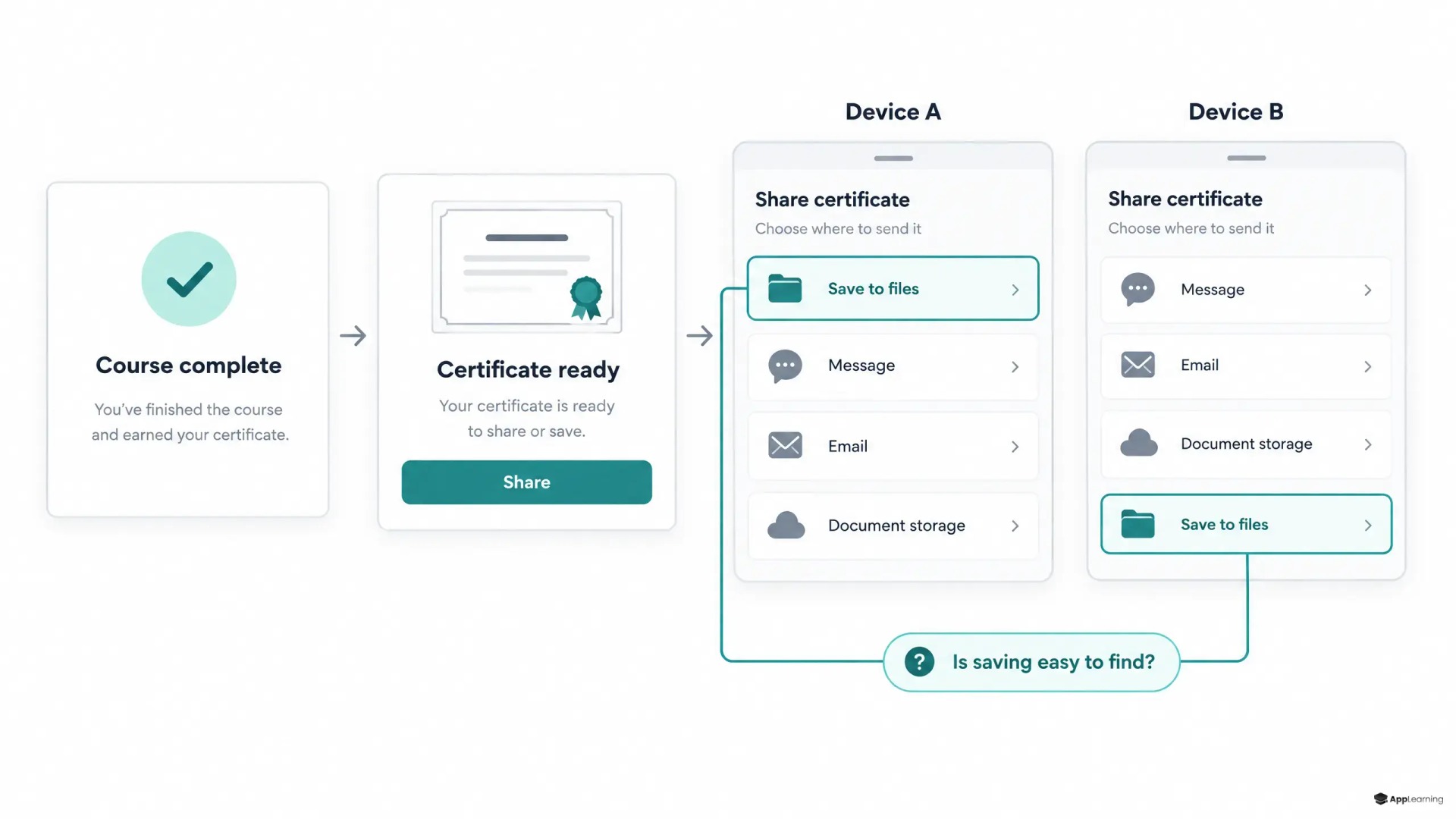
An explicit save control earns its place through testing
A second icon is not automatically an improvement. The decision should follow observed task performance. If learners cannot find a way to retain the certificate, clearer wording such as “Save PDF” or “Save or share certificate” may be enough. A missing save route requires an implementation change, not just a label.
Android provides a document-creation flow that lets users choose where to save a file. (developer.android.com) That offers one implementation option when native sharing does not meet the requirement. For App-Learning, the design target is a consistent certificate record with delivery controls suited to each supported platform.
Good to know
Does every certificate screen need a download button?
No. An explicit control is justified when supported devices lack a suitable save route or testing shows that learners cannot discover it.
Does a saved certificate replace the training record?
The proposed workflow keeps them separate. The academy retains completion evidence while the learner receives a portable copy.
Acceptance ends with a retrieved credential
A mobile learning certificate download should pass device-level scenarios on representative iPhones and Android phones. The test matrix should record operating-system versions, installed destinations and any relevant employer device restrictions.
- Ask a learner to keep the certificate without explaining the icon.
- Save the file, close the academy and retrieve it from the chosen location.
- Open the saved document in another viewer and check its contents.
- Transfer it to an approved destination and inspect what arrives.
- Cancel the handoff and retry without losing access to the certificate.
For finance and crypto academies, completion evidence should remain in the learning system independently of learner exports. Acceptance records should distinguish generation, handoff and successful retrieval rather than treating a share-button tap as delivery.
Review your certificate handoff with App-Learning.
DiscussThe credential must survive the academy interface
Android documents that files saved through its Storage Access Framework outside app-specific storage remain after app removal. (developer.android.com) This illustrates the distinction between app-bound access and a retained document.
For digital credentials, mobile UX should make that distinction clear. The exported certificate needs a recognisable filename, readable learner and issuer details, and a verification route where required. Delivery is complete when the learner can find and use the credential outside the academy—not when the share sheet appears.