

Key takeaways
- In-app guidance is best for timely prompts and task completion.
- Structured training builds understanding of workflows, trade-offs, and risk.
- Complex fintech products usually need both layers working together.
- App-Learning fits products where education must build durable customer confidence.
The false choice at the product edge
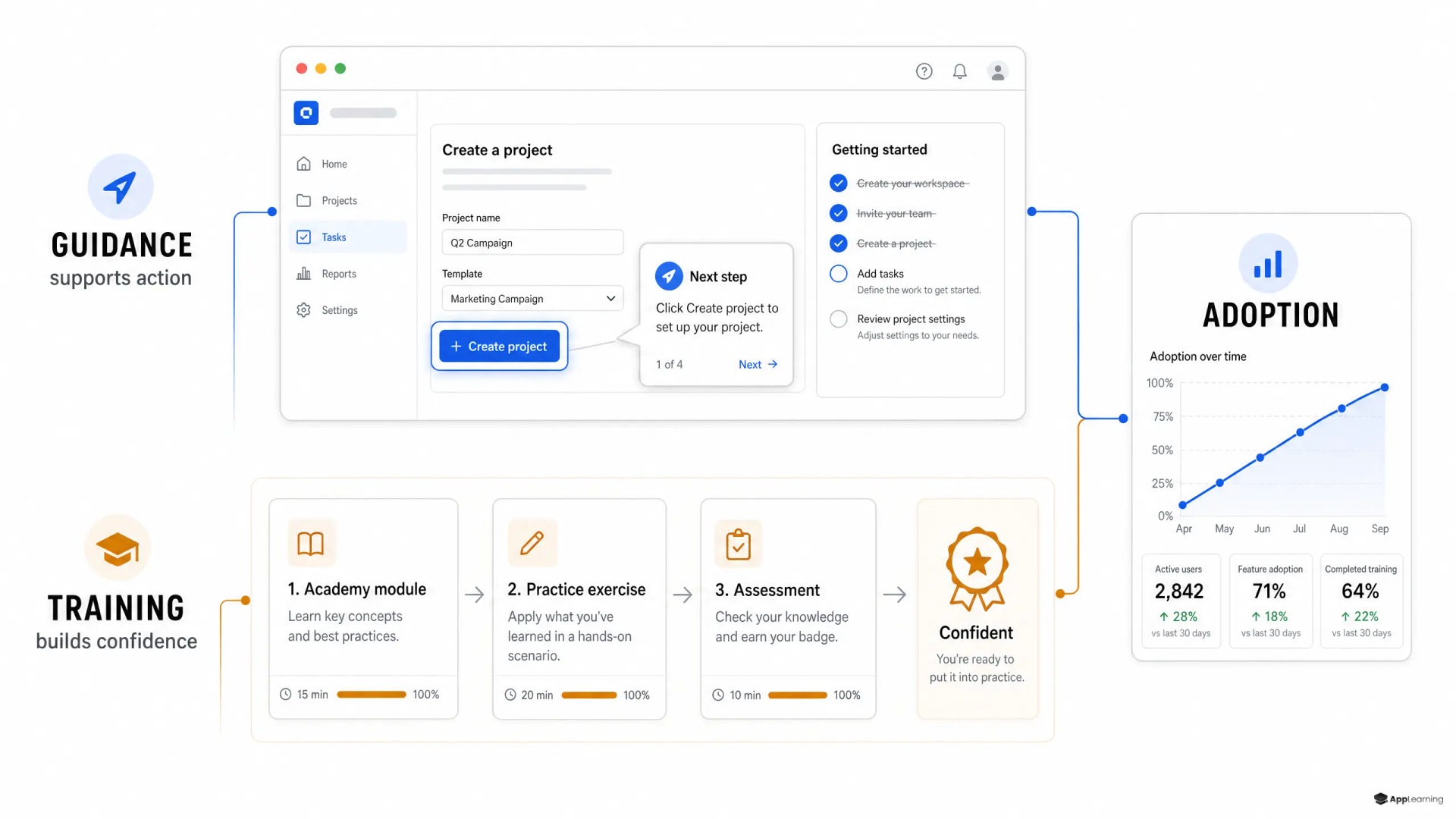
The debate over in-app guidance vs structured customer training often starts in the wrong place. Tooltips, checklists, walkthroughs, and banners are not substitutes for a learning system. They solve a different problem. In-app guidance helps a customer act in the moment. Structured training helps that customer understand the workflow, the terms, and the consequences before the next difficult decision.
For a fintech product, this distinction matters. A customer may need a prompt to complete identity verification or find a portfolio screen. But a prompt cannot carry the full burden of explaining fees, volatility, custody, repayment, or fraud prevention. The CFPB’s financial-education framework makes the useful distinction: effective education should be timely and actionable, but it should also build financial skill and motivation. Product teams need both capabilities.
Guidance moves the next action
In-app guidance is contextual interface support. It appears where the customer is working and points to the next useful action. Modern guide systems such as Pendo Guides use overlays, embedded messages, tooltips, and walkthroughs to highlight UI elements, guide a process, or deliver short information at a relevant moment.
Use this layer when the user already understands the job but needs help with the interface. A tooltip can explain an unfamiliar icon. A checklist can expose the few actions required to reach first value. A contextual prompt can bring an existing customer to a new feature. Keep it brief, specific, and tied to one observable action.
Guidance becomes weak when the customer must form a mental model before acting safely. A five-step tour may show where to buy an asset, but it does not establish whether the customer understands the trade-offs of that purchase. Repeating prompts when users hesitate usually creates guide fatigue. It does not resolve the knowledge gap.
Training builds a durable mental model
Structured customer training organizes learning into a sequence: a clear outcome, short lessons, examples, knowledge checks, and visible progress. It is the better tool when users need to understand a connected workflow, compare options, recognize risk, or build confidence before they use an advanced feature. This is the core difference in in-app guidance vs customer education: guidance removes interface friction, while education reduces uncertainty about the product itself.
A customer training platform should therefore do more than host help articles. It should let teams assign or recommend learning paths, test understanding, localize approved content, and see where learners stop or struggle. App-Learning provides this structured layer with role- and region-based paths, quizzes, progress data, deep links, embeds, and single sign-on for web and mobile experiences.
A journey needs both layers
Map education to the customer journey instead of choosing one format for every problem.
- First session: Use a short welcome and checklist to orient the customer. Avoid teaching the whole product before they see value.
- Activation moment: Add contextual guidance for the required product steps. Link to a short lesson when the action relies on unfamiliar financial concepts.
- Higher-risk action: Put structured education before or alongside the decision. Use a quiz or scenario when the customer must distinguish concepts, limits, or trade-offs.
- Advanced feature adoption: Create a learning path that explains the end-to-end workflow, then use in-app prompts to bring customers back to the relevant screens.
- Lifecycle change: Use guidance to announce a release and training to explain a meaningful new process, policy, or product category.
Good to know
When is in-app guidance enough?
Use it for simple, low-risk tasks where customers understand the goal but need help finding or completing the next step in the interface.
When should a fintech launch structured customer training?
Launch it when customers must understand financial concepts, connected workflows, risk, or trade-offs before using a valuable feature confidently.
Can a customer academy sit inside the product?
Yes. Deep links, embeds, and single sign-on can connect a learning path to the exact product moment where the knowledge is needed.
Complexity sets the boundary
Do not decide by content format or vendor category. Decide by the cost of misunderstanding. In-app guidance is usually enough when an action is reversible, familiar, and self-contained. Structured training becomes necessary when the action has financial consequences, depends on several connected steps, introduces unfamiliar concepts, or creates recurring support demand. The more a customer needs to judge rather than simply click, the stronger the case for learning.
This also changes ownership. Product should own the moments of friction and the behavioral events that trigger support. Education, compliance, and subject-matter experts should own the accuracy and structure of the learning path. A scalable operating model uses approved source material and a defined review loop rather than asking product managers to build every lesson themselves. App-Learning’s content-production workflow is designed to turn existing documents, videos, and expert input into reviewed micro-lessons, quizzes, and academy modules.
Build customer confidence without slowing product delivery.
TalkThe combined strategy checklist
Build the system around decisions, not around content inventory.
- Define the activation or adoption behavior that matters.
- Identify whether the blocker is interface friction or missing understanding.
- Use guidance for one immediate action and training for connected concepts.
- Deep-link each lesson from the screen where the knowledge becomes relevant.
- Track guide completion separately from lesson completion and quiz performance.
- Review support tickets, failed attempts, and learning drop-off together.
- Localize the learning path before expanding the product into a new market.
The strongest customer journey does not force people to choose between doing and learning. It gives them enough direction to move now and enough understanding to make the next decision with confidence. That is how education becomes part of product adoption rather than a help-center afterthought.