
Key takeaways
- Equivalent buttons and linear choices keep gestures from becoming assessment barriers.
- Authoring fields should capture text alternatives, answer meaning and scoring rules.
- Rendered lessons need keyboard, focus and screen-reader testing before release.
- Text scaling and untimed paths belong in the interaction design.
- Severe access failures should block publication and produce reproducible test records.
The Swipe Question With No Keyboard Answer
Five seconds can hide the wrong assessment
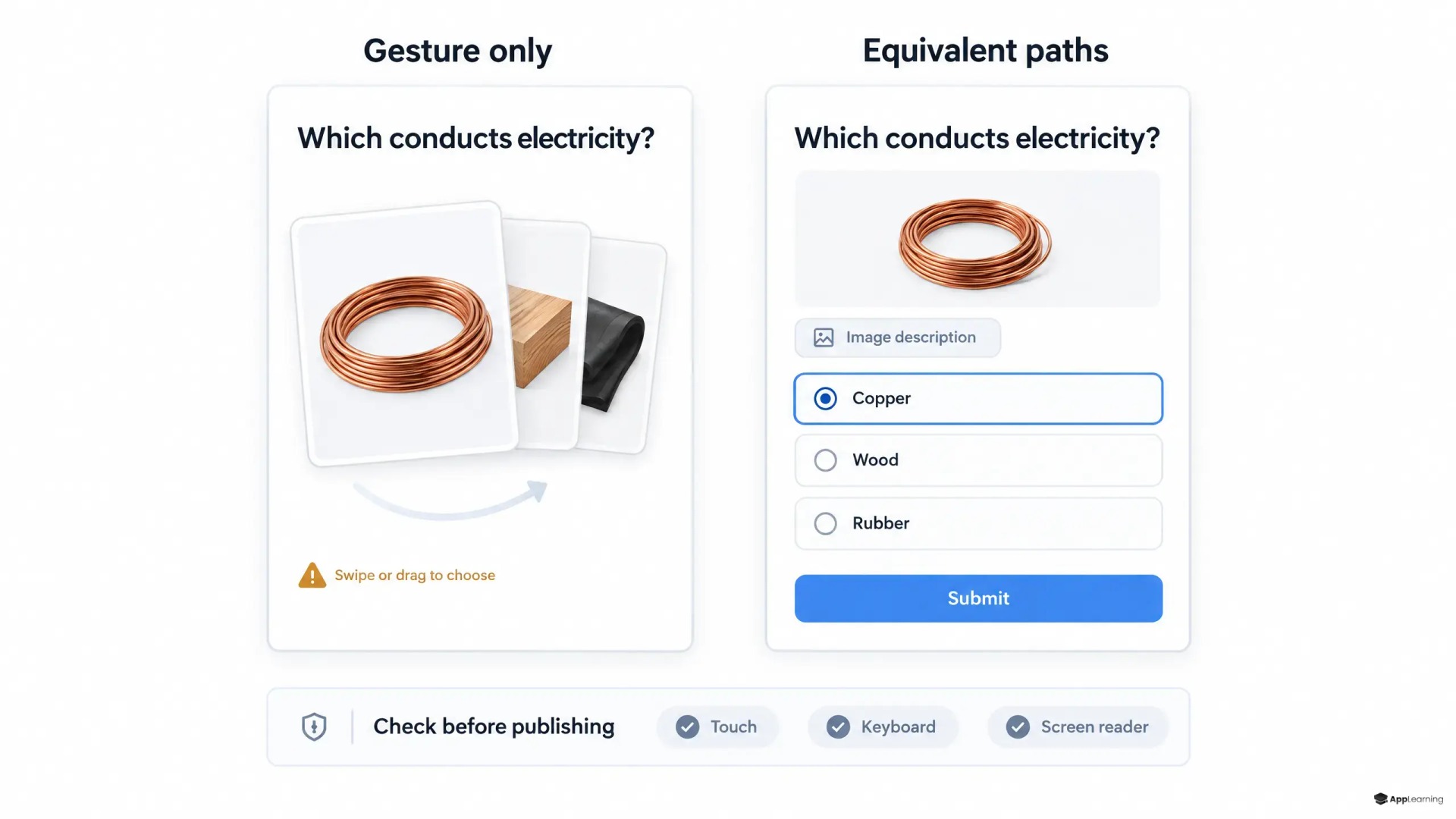
Consider a tariff check that asks an agent to swipe right for the correct offer before a countdown ends. The agent knows the answer but cannot operate the card. Recording that attempt as a knowledge failure would confuse interface access with sales readiness.
Accessible microlearning is not defined by lesson length or mobile delivery. For an academy provider controlling the component library, authoring schema, assessment semantics and mobile renderer, accessibility belongs before publication—not only in an audit after launch.
Equivalent controls protect the meaning of a score
Under W3C’s guidance on dragging movements, (w3.org) keyboard access and a tap-only alternative are separate requirements, subject to stated exceptions. A sorting quiz should therefore offer controls such as Move up and Move down, not merely replace dragging with another gesture. Swipe cards should have explicit answer buttons.
W3C’s timing guidance, (w3.org) requires ways to turn off, adjust or extend content-imposed limits unless an exception applies. For a product-knowledge check, an untimed path is the sensible default. Equivalent paths should preserve the question, scoring and certification outcome.
The schema must describe meaning before presentation
The 12 December 2024 WCAG 2.2 Recommendation, (w3.org) provides benchmarks for non-text alternatives, meaningful sequence, keyboard operation and control semantics. Accessible LMS authoring should translate these concerns into structured fields rather than reminders in an editor’s handbook.
- Each question stores its prompt, answer identifiers, correctness rules and feedback separately from layout.
- Each informative image stores an equivalent description; decorative images are marked explicitly.
- Ordering tasks store the intended sequence independently of draggable positions.
- Each interaction declares its alternative controls and timing policy.
For a diagram-based assessment, the alternative must preserve the task without revealing the answer. That needs editorial judgment, not just a non-empty description field.
Publication checks and device tests cover different failures
W3C’s evaluation guidance, (w3.org) makes clear that no tool alone can establish accessibility. Automated publication checks should reject missing required descriptions, undefined answer references and unsupported interaction configurations. They cannot establish whether feedback makes sense or focus follows the learner’s task.
For this academy’s release process, WCAG mobile learning checks should include the rendered lesson on representative low-end Android devices, using TalkBack, plus VoiceOver on supported iPhones and keyboard navigation where applicable. The test must reach submission, feedback, retry and completion—not stop at the first screen.
One lesson needs an end-to-end acceptance record
Alongside W3C’s text-resizing benchmark, (w3.org) which requires text enlargement up to 200% without losing content or functionality, a practical quiz accessibility acceptance check should cover the whole task.
- Complete every answer through non-gesture controls and keyboard input where applicable.
- Confirm logical reading order, visible focus and no keyboard traps.
- Check that screen readers announce labels, selection states and feedback.
- Enlarge text and verify that answers and submission remain reachable.
- Complete the untimed path with identical scoring and completion tracking.
Review one agent-readiness lesson with App-Learning before your next release.
ReviewRelease ownership belongs with the platform
Product engineering should own component behavior; content teams should own descriptions and assessment meaning; QA should own reproducible interaction tests. Publication should stop when a learner cannot answer, submit or understand essential feedback. Each failure record should include lesson and build versions, device, operating system, assistive technology, steps and expected behavior.
For App-Learning, the governing principle is straightforward. A readiness check should establish whether an agent can sell the product correctly. If the interaction prevents a knowledgeable agent from answering, the system has not measured readiness—it has measured access.